
Best Vision Board Apps 2026: 10 Apps Tested on iPhone and Android
Perfectly Happy is the best vision board app overall. It is the only app with built-in image, affirmation, music and voice libraries plus in-app web search, on both iPhone and Android, and a complete board takes five minutes. Pinterest is good for free image discovery, Canva for template design, Notion for goal tracking attached to the board.
Last updated 25 August 2026. Tested by Joerg Dimeg on an iPhone 16 and a Pixel 9.
Perfectly Happy publishes this comparison and makes the app ranked first. We test every app on the same criteria and list the rating, price and missing features for all of them, including ours.
Which vision board app is right for you
- Best for Android: Perfectly Happy. One of three apps tested that runs on Android.
- Best free tier: Perfectly Happy. Full 6,000-affirmation library, two image libraries, in-app image web search, video slideshow and journals at no cost.
- Best for speed: Perfectly Happy. Five minutes to a finished board.
- Best for image discovery only: Pinterest.
- Best for a printed board: Canva.
How we tested 10 vision board apps
We tested 10 vision board apps between July and August 2026, on an iPhone 16 and a Pixel 9. For each app we built one complete board from scratch, closed the app, and returned after seven days. We scored 23 criteria, grouped into the 11 weighted categories below.
The user ratings in this comparison rest on 19,376 US App Store ratings and 7,363 Google Play ratings, checked on 25 August 2026.
User rating and number of ratings (5%). What do users think about the app? Established app or new one, and how many ratings the score rests on.
Time to create a vision board (10%). Measured with a stopwatch from a fresh install, sourcing images from nothing.
Usability (10%). How easy is it to use?
Audience: Beginner or advanced. Reported for fit, not scored.
Content (20%). Built in image library, affirmation library, music library, voice library.
Customization (15%). Can I change the layout of my vision board, font, colour and write my own?
Features (15%). Affirmations, moving images, music, voices, reminders, widgets, journal.
Visualization and manifestation effect (10%). Does it make it easier to visualize and work towards your goals?
Operating system (2.5%). Does it run on iPhone and Android?
Synchronizing across multiple devices (2.5%). Phone, iPad, tablets.
Subscription model and price (10%). Free trial, subscription types, price.
Ratings and prices were checked on 25 August 2026 and change often. Confirm
on the App Store or Google Play before you subscribe.
Best Vision Board Apps in 2026 Compared
| CRITERIA | Perfectly Happy Vision Board | Wisher | Horizons | Dreamer | Why Vision Board | Vision Board 2027 | Vision Board Aesthetic | Vision Board ++ | Visuapp | Visbo | |
|---|---|---|---|---|---|---|---|---|---|---|---|
 |  |  |  |  |  |  |  |  |  | ||
| Score (weighted) | Our weighted total across 23 criteria | A (97) | D (39) | C (53) | C (59) | C (53) | C (59) | C (49) | A (90) | C (50) | B (64) |
| iOS iPhone Rating (US) | How do iPhone users rate the app? | 4.8* | 4.8* | 4.7* | 4.7* | 4.7* | 4.6* | 4.7* | 4.9* | 4.7* | 4.5* |
| No. of Ratings (US) | Is there a meaningful number of ratings? | 4597 | 100 | 410 | 1037 | 1,466 | 2,720 | 3756 | 3001 | 2,187 | 102 |
| Android Rating | How do Android users rate the app? | 4.6* | ❌ | ❌ | ❌ | ❌ | ❌ | ❌ | ❌ | 4.6* | 3.9* |
| No. of Ratings | Is there a meaningful number of ratings? | 1995 | ❌ | ❌ | ❌ | ❌ | ❌ | ❌ | ❌ | 4,951 | 417 |
| Time to create a vision board | How long does it take to create a vision board? | 5 min | 10 - 20 min | 10 mins | 10 mins | 10 - 20 min | 10 min | 10 - 20 min | 7 - 10 min | 7 - 20 min | 7 - 10 min |
| Usability | How easy is it to use? | ⭐⭐⭐⭐⭐ | ⭐⭐⭐⭐ | ⭐⭐⭐ | ⭐⭐⭐⭐ | ⭐⭐⭐⭐⭐ | ⭐⭐⭐⭐⭐ | ⭐⭐⭐ | ⭐⭐⭐⭐⭐ | ⭐⭐⭐ | ⭐⭐⭐ |
| Audience | For beginners, advanced users? | Beginner, Advanced | Beginner, Advanced | Advanced | Beginner, Basic | Beginner, Basic | Beginner, Advanced | Beginner, Basic | Beginner, Advanced | Beginner, basic | Beginner, Advanced |
| Image library | Built in image library | ✅ | ❌ | ✅ | ✅ | ✅ | ✅ | ❌ | ✅ | ❌ | ✅ |
| Affirmation library | Built in affirmation library | ✅ | ✅ | ❌ | ❌ | ❌ | ❌ | ❌ | ✅ | ❌ | ❌ |
| Music | Music | ✅ | ❌ | ❌ | ❌ | ❌ | ✅ | ✅ | ✅ | ✅ | ✅ |
| Voice - Spoken affirmation | Spoken affirmations - voice | ✅ | ❌ | ❌ | ❌ | ❌ | ❌ | ❌ | ✅ | ❌ | ❌ |
| Vision board customization | Can I change the layout of my vision board, font, color? | ⭐⭐⭐⭐⭐ | ⭐ | ⭐⭐⭐ | ⭐⭐⭐ | ⭐⭐ | ⭐⭐⭐ | ⭐⭐⭐ | ⭐⭐⭐⭐⭐ | ⭐⭐⭐ | ⭐ |
| Slide show - music & voice | Slide show with music, voice | ✅ | ❌ | ❌ | ❌ | ❌ | ❌ | ❌ | ✅ | ❌ | ✅ |
| Add Affirmations | Add Affirmations | ✅ | ❌ | ✅ | ✅ | ✅ | ✅ | ✅ | ✅ | ✅ | ✅ |
| Reminder | Reminder | ✅ | ✅ | ✅ | ✅ | ✅ | ❌ | ✅ | ✅ | ❌ | ✅ |
| Widgets | Widgets | ✅ | ❌ | ❌ | ✅ | ✅ | ✅ | ✅ | ✅ | ❌ | ✅ |
| Journal | ✅ | ❌ | ✅ | ✅ | ❌ | ❌ | ❌ | ✅ | ❌ | ❌ | |
| Visualization/ Manifestation impact | Does it make it easier for you to visualize and manifest your dreams and goals? | ⭐⭐⭐⭐⭐ | ⭐⭐⭐ | ⭐⭐⭐ | ⭐⭐⭐ | ⭐⭐⭐ | ⭐⭐⭐ | ⭐⭐⭐ | ⭐⭐⭐⭐ | ⭐⭐⭐ | ⭐⭐⭐ |
| Availability | Does it run on iOS and Android? | iOS, Android | iOS | iOS | iOS | iOS | iOS | iOS | iOS | iOS, Android | iOS, Android |
| Synchronizing across multiple devices | Does it run on Ipad? Does it run on tablets? | iPad Tablets | ❌ ❌ | iPad Tablets | iPad ❌ | ❌ ❌ | ❌ ❌ | ❌ ❌ | iPad ❌ | iPad Tablets | iPad Tablets |
| Subscription model and price | Subscription model & price | $11/m $59/y | $7/w $50/y | $4/m $13/y $20/Lfl | $4/m $23/y | $4/m $20/y | $3/w $6/m $30/y | $6/w $23/y | $5/m $19/y | in app purchases for different features | $21/y |
| Free trial | Does the app offer a free trial? | 7- day trial | 3- day trial | ❌ | 3- day trial | 3- day trial | 3- day trial | ❌ | 3- day trial | Free trial | 7-day trial |
Score is our weighted total across the 23 criteria, using the category weights listed above. A = 90+, B = 60 to 89, C = 40 to 59, D = below 40. Perfectly Happy publishes this comparison and scores itself on the same rubric as every other app.
iOS figures are US App Store ratings and counts, taken from Apple’s public lookup data. Other comparisons that count all 163 Apple storefronts will show higher iOS totals. Google Play publishes a single worldwide figure with no country breakdown, so Android numbers are global. Both checked 25 August 2026 and change continuously.
Pinterest, Canva and Notion are not in the table above. They are not vision board apps. They are an image discovery engine, a design tool and a note-taking app that people use to build vision boards. Scoring them on affirmation libraries and spoken affirmations would tell you nothing useful. We review them separately below, because most people start with one of them.
What Is a Vision Board App?
A vision board app (sometimes called a digital vision board app) is a mobile or web based application that helps people visualize their goals using images, words, and affirmations. Instead of creating a physical vision board with paper and cutouts, users design vision boards digitally within an app, making them easy to update and review anytime.
Vision board apps are commonly used to support motivation, focus, and mindset. Many vision board apps also include features such as affirmations, reminders, journaling, or mood tracking to help users stay connected to their goals on a daily basis.
Below, we review the most effective vision board apps for 2026, using the weighted criteria above.
A detailed, in depth analysis of the digital vision board apps for the iPhone, iPad, and Android 2026:

Vision Board - Perfectly Happy
iPhone – Rating (US): 4.8* stars – 4597 user ratings
Android – Global Rating: 4.6* stars – 1995 user ratings
Free Trial: 7 days
Time to create vision board: 5 mins
Download Perfectly Happy Vision Board App – App Store (iOS)
Download Perfectly Happy Vision Board App – Google Play (Android)
What users say
“I’ve downloaded every vision board in the App Store and this is the best BY FAR.”
– Dawn30000, App Store ★★★★★
“It’s a simple vision board app, yet still very flexible.”
– George Free, App Store ★★★★★
“This app is beautiful and full of such positive energy for you to maximize.”
– Julie Ann, App Store ★★★★★
“Helped me feel better immediately.”
– M Williams, Google Play ★★★★★
“This app creates peace and helps me keep focused.”
– Angel L, Google Play ★★★★★
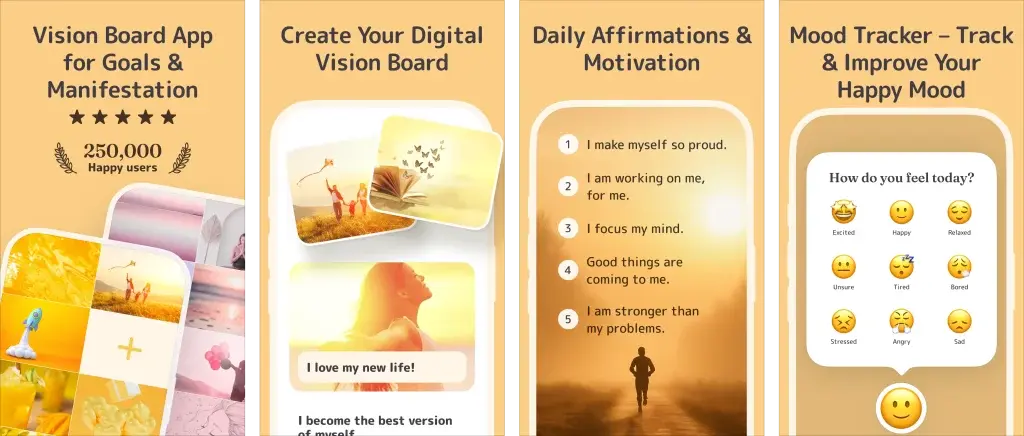
Perfectly Happy vision board app is a simple, highly customizable vision board app that lets users create digital vision boards using images, affirmations, and music to support visualization and motivation. Designed to be easy to use while adapting to different goals and life situations, it helps users stay focused on a positive mindset in everyday life.
We reviewed the Perfectly Happy vision board app to understand why it stands out, and found it combines flexibility with simplicity, making it a practical tool for staying focused on goals in a fast-paced environment.
Usability
One of the things I love about the Perfectly Happy Vision Board App is how user friendly it is. The app’s clean and intuitive interface ensures that all features are easy to navigate, allowing users to create a personalized vision board in just 5 minutes, a significant advantage for those who want quick and efficient goal-setting tools. This makes it a practical choice for anyone, regardless of age or technical ability. This app makes it easy for anyone to make their dreams come true. And it’s available on both iOS and Android, so you can carry your dreams with you wherever you go.
Perfectly Happy is a Digital Vision Board App for Goal Visualization and Daily Affirmations
Content
What sets this app apart? The content! Perfectly Happy Vision Board App has the largest built-in libraries of any vision board app. You can search two extensive in app image libraries, and you also have an in-app web search function (which no other app offers!). There’s an extensive affirmation library, with over 6000 affirmations, and you can choose from a music library too. Why is this important? This will greatly reduce the amount of time you will need in the first place to create a vision board with content that will appeal to you emotionally. Whether you’re focusing on positive thinking, motivation, wealth, lifestyle, travel, control stress, better sleep, family, love, or happiness, this app has you covered. You can even upload images via in app web keyword search or your own photos and music, making the creation process smooth and efficient. With over 6,000 positive affirmations and motivational quotes, you’ll never run out of inspiration.
Customization
Personalization is key when it comes to manifesting your dreams. The Perfectly Happy vision board app lets you customize everything, eg text, colors and music. You can even change the duration of each image in your vision board video clip, allowing you to make your vision board uniquely yours, making the experience deeply personal and powerful. You can choose from a library of different female and male voices for your affirmations, or record your own voice to give your vision board a more personal touch.
Features
This app is like having a personal coach in your pocket. It offers daily reminders to review your vision board and affirmations, keeping your goals front and center. Plus, it comes with affirmation widgets, vision board widgets, a gratitude journal and mood tracker to help you stay positive and focused. With these features, you’re not just dreaming, you’re actively moving toward your goals every single day.
Visualization and Manifestation Effect
Now, let’s talk about why this app is so powerful. Visualization and affirmations are two tools that successful people swear by. They help you see your goals clearly and replace negative thoughts with positive ones. Visualization is a powerful tool that creates a mental image of your goals, helping to bring them into your conscious awareness. Meanwhile, affirmations work by rewiring your brain, replacing negative thought patterns with positive ones. Together, these tools can significantly boost your self-esteem, enhance your focus, and increase your chances of achieving your goals. The Perfectly Happy Vision Board App combines these powerful practices into one easy to use platform, making it a true manifestation powerhouse.
And the best part? By combining these elements into a custom vision board video slideshow with your choice of music and spoken affirmations, Perfectly Happy Vision Board app creates a vivid and inspiring visual representation of your goals, making it easier to manifest them into reality. This takes visualization to the next level, making your goals feel more tangible and achievable.
User Rating and Number of Ratings
With a glowing 4.8* stars US rating (4597 ratings) on the iPhone , 4.6* stars global rating on Android (1995 ratings), and over 250,000 happy, registered users, Perfectly Happy Vision Board App has garnered widespread acclaim for its effectiveness and ease of use.
Operating System and Synchronizing Across Multiple Devices
Perfectly Happy Vision Board app is available on both iOS iPhone and Android, making it accessible to a wide range of users. It syncs effortlessly across devices, so your vision board is always with you, whether you’re on your phone, iPad, or tablet.
Subscription Models and Price
The free version includes one vision board, the full affirmation library, the video slideshow with music and spoken affirmations, widgets, reminders, a gratitude journal and a mood tracker. For $11 a month or $58.99 a year you unlock premium affirmation categories and multiple vision boards. There’s also a 7-day free trial, so you can test it out before committing. This is not the cheapest app in this comparison, but the free tier is the most complete.
Perfectly Happy Vision Board App - Summary Pros and Cons
Pros:
- It’s a simple vision board app, yet still very flexible. Very user friendly interface, easy and effortlessly to create a vision board
- A wealth of resources at your fingertips: By far the biggest built-in image library (two libraries), affirmation library (6000+ affirmations) and music library
- Easy to use web search with direct image upload to your vision board, very handy and time saving
- Easy visualization and manifestation through a more immersive experience: Perfectly Happy creates a vivid and inspiring video slideshow, making it easier to manifest your goals into reality
- Lots of helpful vision board ideas and examples
- Makes it easy for beginners to use all features with helpful vision board introduction tutorials and explanation videos
- Highly customizable with many different fonts, colors, music, voices, own voice
- Affirmation widgets and affirmation reminders to keep your goals front and center
- Highly rated by users and has received widespread acclaim for its effectiveness and ease of using
- Available for iOS iPhone and Android. Also, easily syncs across devices such as iPhone, iPad or tablet
- A vision board, affirmations and gratitude journal, mood journal, widgets and reminders are all completely free. Also offers a 7-day free trial for premium features
Cons:
- Not the cheapest, but it is the highest quality
- Only app version, no web version
Final Thoughts
Perfectly Happy is a simple and flexible vision board app that helps you visualize your goals through digital vision boards, affirmations, gratitude journaling and mood tracking, all in one place. Two built-in image libraries, an in-app web search and over 6,000 affirmations mean you build a finished board in five minutes instead of hunting for content first. Add your own music, pick a voice for your affirmations or record your own, and the app turns the board into a video slideshow you actually want to watch. W dgets and daily reminders keep it in front of you between sessions.
It works on iPhone, iPad, Android and tablets, and syncs across all of them. Beginners get tutorials. Experienced users get the customization.
Start with the free version and see how a board feels after a week.
Download Perfectly Happy Vision Board App

Wisher Vision Board App
iPhone – Rating (US): 4.8* stars – 100 user ratings
Android – Rating: N/A
Free Trial: 3 days
Time to create vision board: 10-20 mins
Wisher app – download
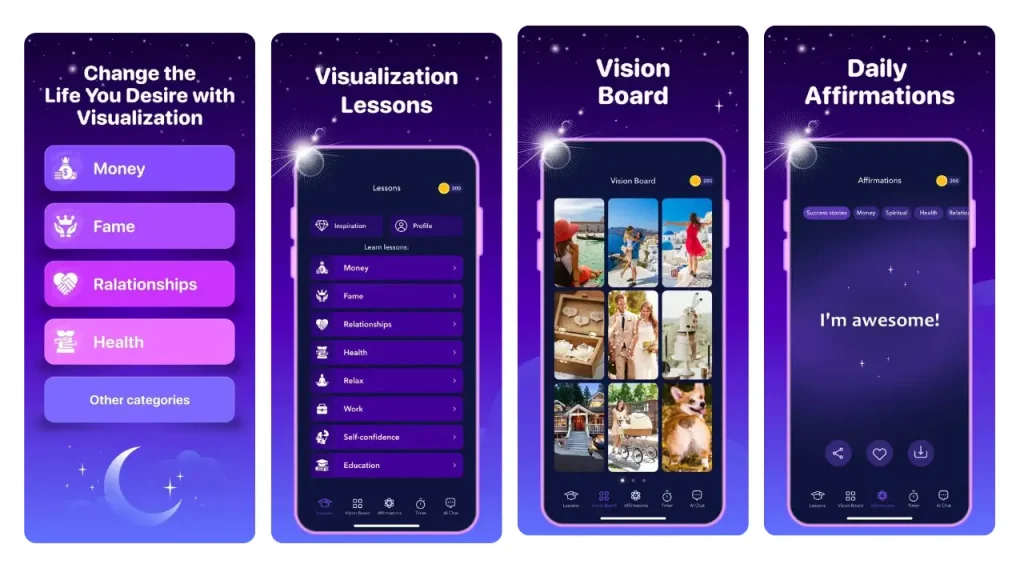
The Wisher App is a beautifully designed tool that goes beyond only vision boards, offering additional features like affirmations, self improvement lessons, a visual timer for meditation, and an AI Chat for goal support. Here’s a breakdown of its strengths and weaknesses based on key criteria.
Usability
Wisher is easy to use. However, the app’s interface, while visually appealing, is somewhat overloaded with features, which can make navigation slightly confusing for beginners. Also, you cannot add text or affirmations to vision boards.
Wisher - in app screens
Audience
The app is suitable for both beginners and advanced users.
Content
Wisher does not include a built-in image library. This means that users have to upload their own images or download them from the internet to their phone and upload them back into their vision board, which can be very time consuming. The lack of an image library could be a deal-breaker for those looking for a more comprehensive vision board app. Also, you cannot add text or affirmations directly to your vision boards, which is a big drawback. The app has a robust library of affirmations and lessons, though these features are locked behind a subscription.
Customization
Users can choose between two free layouts and add up to 13 images per board, though the ability to customize beyond this is limited. There’s no way to add text or change fonts and colors, which severely limits personalization.
Features
While Wisher lacks moving images, music, and widget support, it does offer unique features like a visual timer for meditation and an AI Chat for additional guidance. These tools, along with affirmations and lessons, are aimed at enhancing your journey toward achieving goals but require a subscription.
Visualization and Manifestation Effect
The app’s core function, which is creating vision boards, can be effective, but the lack of a built-in image library and the inability to add text limit its impact. The additional features like affirmations and AI support can enhance manifestation, though these are only accessible with a paid plan.
User Rating and Number of Ratings
Wisher has an iPhone rating (US) of 4.8* stars, but was only rated by 120 users, which is why the rating is not entirely meaningful and indicates a still very small user base0
Operating system and synchronizing across multiple devices
Wisher is currently available only on iOS. The app does not support synchronization across multiple devices like iPads or other Apple products.
Subscription Model and Price
Wisher is free to download, but the most compelling features require a subscription. The pricing starts at $7 per week (which is an expensive $364 per year for 52 months) or $50 per year, making it potentially expensive, especially if you opt for the weekly plan. The app also offers a free 3 day trial.
Wisher Vision Board app - Summary Pros and Cons
Pros:
- Visually appealing interface
- Includes lessons, affirmations, and AI Chat for goal support
- Visual timer for mindfulness practices
Cons:
- Lacks basic features: Text and affirmations cannot be added to vision boards
- No built in image library
- No advanced layout customization, like color or font customization
- No widgets
- Lacks synchronization with iPad
- Very expensive depending on the type of subscription you choose
Final Thoughts
For users looking for an app with additional tools for goal achievement, Wisher offers a comprehensive package, albeit at a price. However, the lack of built in basic vision board features, no image libraries, and very limited customization may cause some to look for alternative vision board apps.

Horizons
iPhone – Rating (US): 4.7* stars – 410 user ratings
Android – Rating: N/A
Free Trial: N/A
Time to create a vision board: 10 mins
Horizons app – download
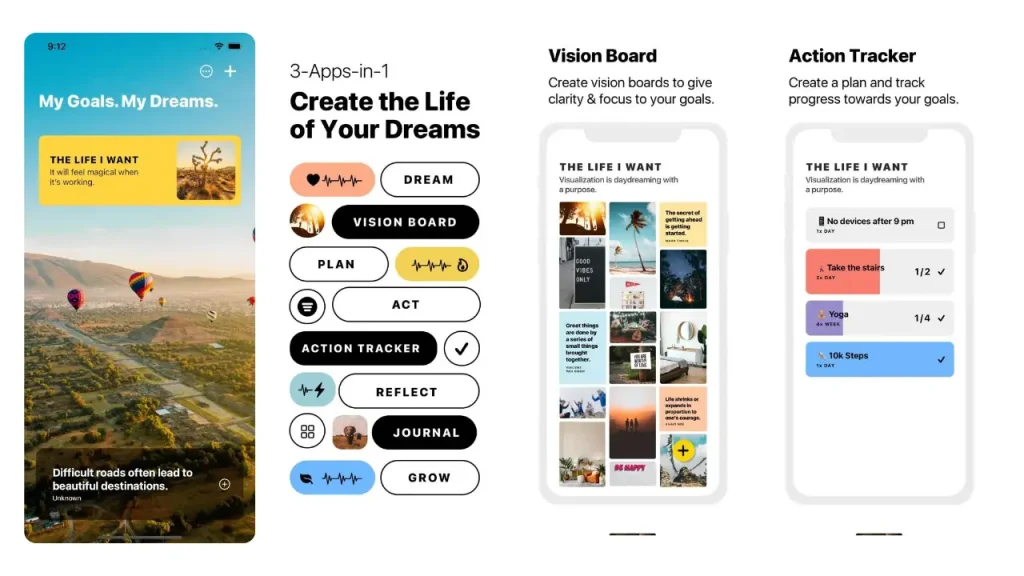
Horizon provides tools to help you visualize your future goals, including a vision board, affirmations, action tracker, and progress journal.
Usability
Horizons offers a range of features that can be highly beneficial, but the app’s usability is somewhat mixed. While it provides an intuitive layout for creating and managing vision boards, some users may find the interface challenging, particularly when reordering images. These usability issues can detract from the overall experience, especially for those new to such tools.
Horizon - in app screens
Audience
The Horizons App is versatile enough to cater to both beginners and advanced users. However, the learning curve associated with certain features might be a hurdle for less tech savvy users.
Content
Horizons boasts a robust image library powered by Unsplash, allowing users to find high-quality images to populate their vision boards. However, the app does not have an extensive affirmation library. It also has no music or no voice library for spoken affirmations. Why is this important? In-app libraries help to tremendously cut down the time required for the vision board creation process. It is very tedious and time consuming if you cannot select your desired content directly in the app and have to search for it externally.
Customization
The app allows for significant customization, letting users create and organize multiple vision boards focused on different areas of life. Users can personalize their boards by adding custom quotes, though the app does not offer extensive options for altering font styles or colors. A notable limitation is that images cannot be viewed in full screen, which can detract from the impact of the digital vision board.
Features
While Horizons excels in providing an action tracker and progress journal, it falls short in other areas. The app does not support moving images, music, or reminders, and lacks widget support. These features are especially important for users who want to stay connected to their goals and objectives throughout the day. These missing features might be disappointing for users who are looking for a more immersive and interactive experience.
Visualization and Manifestation Effect
Horizons is designed with goal visualization in mind, offering daily inspiration and motivational messages. However, the lack of full-screen image viewing and limited interactive features may reduce its effectiveness in helping users deeply connect with their vision boards. The action tracker, on the other hand, is a strong feature that can help users stay on top of their goals.
User Rating and Number of Ratings
The Horizons app has a solid 4.7* stars rating on iOS (US), but was only rated by 394 users, which is why the rating is not entirely meaningful and indicates a small number of users.
Operating System and synchronizing Across Multiple Devices
Horizons is available on both iOS and Android, making it accessible to a wide range of users. The app supports synchronization across multiple devices, including iPads and Android tablets.
Subscription Model and Price
Horizons is free to download, but many features require in-app purchases. The monthly subscription is $4 per month, the annual subscription is $13, and the lifetime subscription is $20. The one time payment model is a plus, offering users access to premium features without the need for a recurring subscription.
Horizons App - Summary Pros and Cons
Pros:
- Built-in image search library
- Allows users to track actions
- Offers one time in-app purchases
- Available on both iOS and Android, with synchronization across devices
Cons:
- No full-screen image viewing limits the effectiveness of vision boards
- Some features are not user friendly
- No extensive built in affirmation library, moving images, music, or widgets
- Complex for beginners: May present a learning curve for less tech savvy users
Final Thoughts
With its extensive image library, action tracker, and ability to manage multiple vision boards, it offers a solid approach to goal setting. However, the Horizons app’s lack of full screen image viewing, occasional usability challenges, and missing advanced features like an affirmation library or widgets may detract from its overall effectiveness.

Dreamer App
iPhone – Rating (US): 4.7* stars – 1037 user ratings
Android – Rating: N/A
Free Trial: 3 days
Time to create a vision board: 10 mins
Dreamer app – download
In the realm of vision board apps for 2026, the Dreamer app emerges as a noteworthy option, but only for iOS users. This review breaks down its strengths and weaknesses across several key criteria.
Usability
The Dreamer App is user friendly, making it accessible for beginners. Its clean interface allows for quick navigation and efficient vision board creation. You can craft a digital vision board in just 10 minutes, making it ideal for those who prefer a streamlined process.
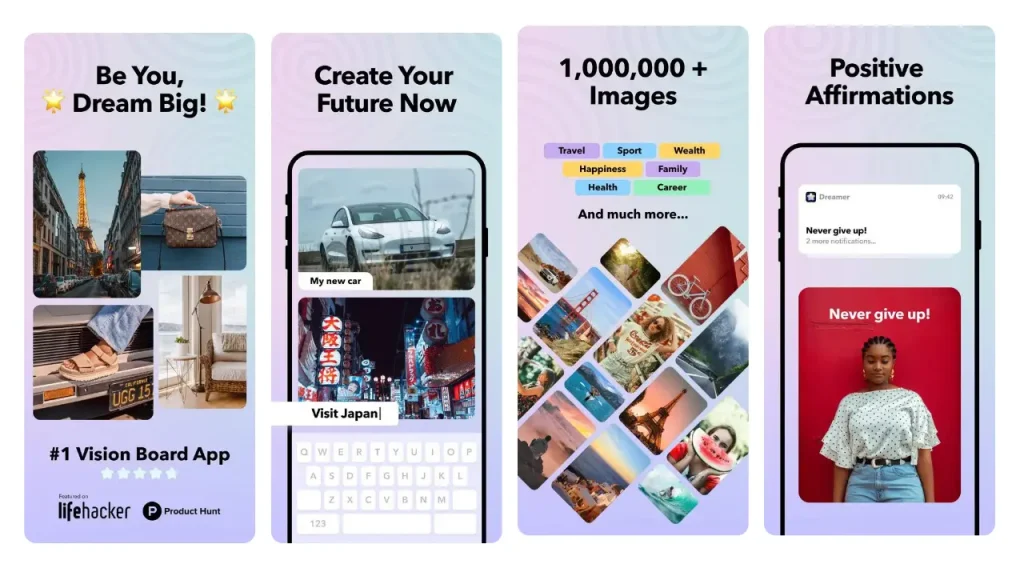
Dreamer - in app screens
Audience
Dreamer App caters well to beginners. Advanced users may find it lacking in more sophisticated features that allow for deeper customization and enhanced functionality.
Content
The app includes a built in image library that covers various aspects of life, offering a decent selection for users to create their boards. However, it falls short in other areas, such as lacking a built in affirmation library, music, voices, image web search, which makes the vision board creation process more time consuming. This might limit the app’s appeal for users seeking a more sophisticated vision board experience.
Customization
Dreamer App provides some basic customization options. Users can choose from six different layouts and add text to personalize their boards.
Features
While the Dreamer App offers widgets, affirmations, and a diary to help keep users motivated, it lacks more advanced features like moving images, music integration, and vision board reminders. The absence of dynamic images and music makes the finished vision board somewhat less emotionally appealing and could be a limitation for users who value these elements in their visualization practices.
Visualization and Manifestation Effect
One of the app’s strong points is its ability to save vision boards as screensavers. This feature enhances daily visualization, making it easier for users to keep their goals front and center. However, the lack of reminders and more dynamic features like moving images might lessen its overall impact on long term manifestation efforts.
User Rating and Number of Ratings
The Dreamer App has received a user rating of 4.7* stars iOS (US), reflecting a generally positive reception. Only 1037 user ratings also show that the app has been rated by some users, although not really as many as the leading vision board apps.
Operating System and synchronizing Across Multiple Devices
Currently, the Dreamer App is available only on iOS, not on Android. The app allows users to synchronize their vision boards with the iPad.
Subscription Model and Price
The Dreamer App is free to download, with a three-day trial available for premium features. The subscription costs $4 per month or $23 per year, which is necessary for accessing the full image library and the ability to create multiple vision boards.
Dreamer App - Summary Pros and Cons
Pros:
- Intuitive to use
- Built-in image library offers a variety of images to choose from
- Includes widgets, affirmations, and a diary
- Save boards as screensavers
Cons:
- A limit of 9 images per vision board, which might be restrictive
- No built in affirmation library, image web search, which makes the vision board creation more time consuming
- Limited customization options for affirmations
- No vision board movie slideshow with moving images
- iOS Only: Not available for Android users
Final Thoughts
The Dreamer App is a solid choice for those looking to create very basic vision boards. However, users who want an emotional vision board experience with moving images, music and reminders and want more extensive personalization may find it lacking.

Why Vision Board
iPhone – Rating: 4.7* stars – 1466 user ratings
Android Rating: N/A
Free Trial: 3 days
Time to create a vision board: 10 – 20 mins
Why app – download
The Why Vision Board is a straightforward tool designed to help users create personalized vision boards using only their own images and affirmations as it lacks an comprehensive image and affirmation libraries.
Usability
The Why Vision Board App is very easy to use, making it accessible even for beginners. The app features a simple interface that guides users through the process of creating a vision board with minimal effort. However, the lack of some basic editing options might be a limitation for those looking for more control over their board’s layout.
Why App - in app screens
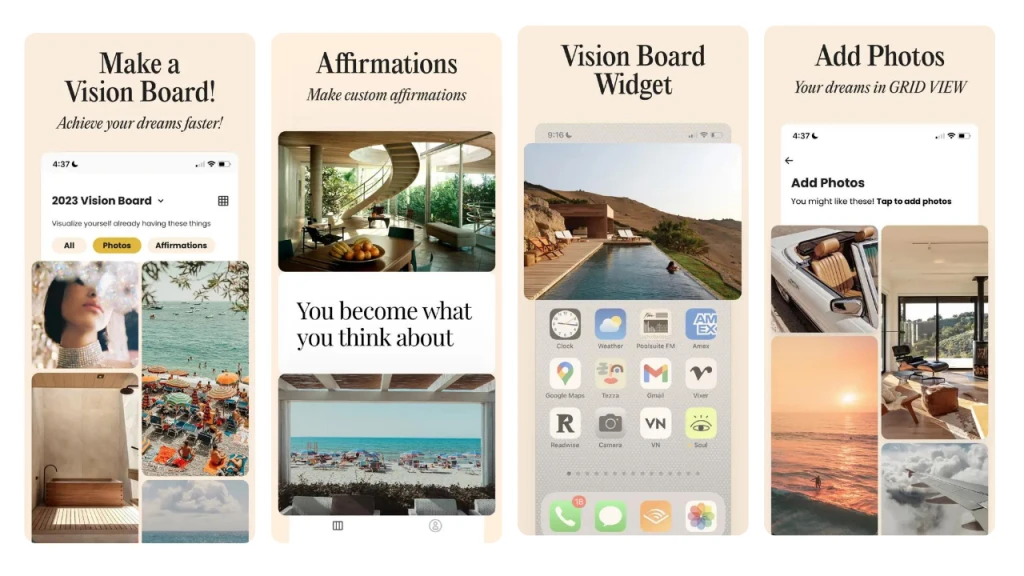
Audience
This app is particularly well suited for beginners due to its simplicity. Some users could find the app lacking in basic features like image reordering.
Content
One of the significant drawbacks of the Why Vision Board App is its limited content offerings. The app includes only a very small built in image library and does not feature a preloaded affirmation library. This means users will need to upload their own images or download them from the internet on their phone and upload them again into their vision board, which can be time consuming. The absence of an extensive image or affirmation library could be a deal-breaker for those seeking a more comprehensive vision board app.
Customization
While the app allows users to add custom images and affirmations, its customization options are somewhat limited. You can choose between different grid views for displaying images and affirmations, and there’s a shuffle mode for images. However, once images are added, they cannot be reordered or edited later. This lack of flexibility might frustrate users who wish to tweak their vision boards as their goals evolve.
Features
The Why Vision Board App includes some useful features such as widgets and reminders, which can help keep users engaged with their goals. However, it lacks other advanced features like moving images, music, and a built-in affirmation library, which are found in the best vision board apps.
Visualization and Manifestation Effect
The app’s ability to send daily notifications as reminders of your vision board is a thoughtful feature. Moreover, the inability to view the entire vision board on one screen might lessen the impact of daily visualization, as it requires additional scrolling to see the complete board.
User Rating and Number of Ratings
The Why Vision Board App boasts a solid iOS rating(US) of 4.7* stars based on 1466 user ratings.
Operating System and synchronizing Across Multiple Devices
The app is currently available only on iOS and not on Android. It does not offer synchronization across multiple devices, which could be a limitation for users who like to work on their vision boards from both their iPhone and iPad.
Subscription Model and Price
The app is free to download, with a three-day free trial available for new users. To access premium features, such as creating unlimited vision boards and adding unlimited images, users will need to subscribe for $19.99 per year. While this price is reasonable, the necessity of finding and uploading your own images and affirmations might not justify the cost for some users.
Why Vision Board App - Summary Pros and Cons
Pros:
- Simple, user friendly interface
- Widgets and reminders to help keep users engaged with their goals
Cons:
- Small built in image library and no pre-loaded affirmation library can make the vision board creation very tedious and lengthy
- Very restricted customization: No option to reorder or edit images once uploaded
- Visualization limitations as the full-page display doesn’t fit on one screen
- Lacks synchronization with iPad
Final Thoughts
For users looking for a simple and straightforward vision board app, Why Vision Board might be a good choice, particularly if you already have your images and affirmations ready. However, if you’re looking for a more comprehensive content library for a quick vision board creation process or if you need more advanced features, you might want to explore other digital vision board options.

Vision Board 2027
iPhone – Rating (US): 4.6* stars – 2720 user ratings
Android – Rating: N/A
Free Trial: 3 days
Time to create a vision board: 10 mins
Vision Board 2027 – download
The Vision Board 2027 app is a tool designed to help users set and visualize life goals using the principles of Feng Shui’s Bagua Map. While this is a unique approach to goal-setting among vision board apps, the app has its strengths and weaknesses that potential users should consider.
Usability
The Vision Board 2027 is user friendly, making it easy to create a vision board in about 10 minutes. The interface is straightforward, guiding users through filling out nine fields corresponding to different life areas. Each field requires a photo, which can be uploaded by the user or selected from an image library (available with a subscription). The simplicity of the process makes it accessible to beginners, but the requirement to complete all nine fields may feel restrictive to those who want to focus on one life goal at a time and prefer a more flexible approach.
Vision Board 2027 - in app screens
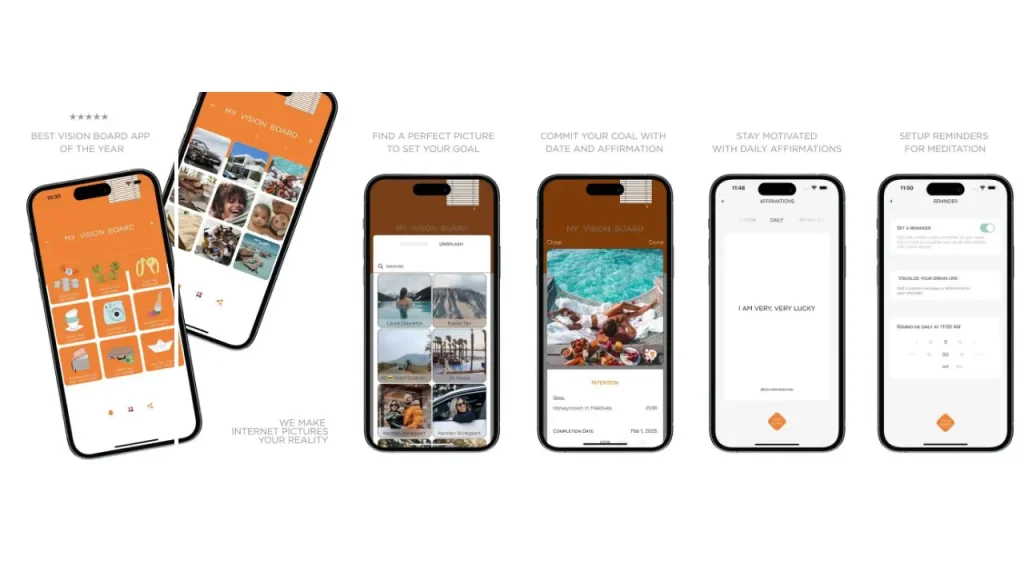
Audience
The app is suitable for both beginners and more experienced users who appreciate a structured approach to goal-setting. However, some users might feel limited by the rigid structure and the necessity to adhere to nine specific life areas defined by the Bagua Map.
Content
The Vision Board App includes access to an image library powered by Unsplash, but only for premium subscribers. There is no built-in affirmation library, which is a significant drawback for users who rely on affirmations as part of their manifestation practices. The absence of pre made content means users will need to invest time in creating custom affirmations, which could be a barrier for some.
Customization
Customization options are limited. Users can add captions and set deadlines for each goal, but the overall layout and design options are minimal. The background color can be customized, but this feature is locked behind a 30 second ad, and the color options available are not particularly visually appealing. Additionally, users are restricted to a maximum of nine images per board, aligning with the nine fields of the Bagua Map.
Features
The Vision Board 2027 lacks many advanced features that are common in other vision board apps. There are no options for moving images, music, spoken affirmations or widgets. The app focuses more on the conceptual framework provided by the Bagua Map rather than offering a wide range of multimedia features. This focus may appeal to users interested in Feng Shui, but it could disappoint those looking for a more dynamic and customizable experience.
Visualization and Manifestation Effect
The unique use of the Bagua Map in the app offers a structured way to visualize and manifest goals, which can be helpful for those who appreciate Feng Shui principles. However, the lack of flexibility and the visually unappealing final output may hinder its effectiveness for users who are motivated by aesthetics. The need to fill in all nine fields can also feel limiting, potentially reducing the app’s overall impact on goal achievement.
User Rating and Number of Ratings
Vision Board 2027 has an iPhone rating (US) of 4.6* stars, which is at the lower end of the reviewed vision board apps. The rating is based on 2720 user ratings, which makes it meaningful.
Operating System and synchronizing Across Multiple Devices
The Vision Board 2027 App is available exclusively on iOS.
Subscription Model and Price
The app is free to download, but accessing premium features requires a subscription. The subscription options are $3 per week, $6 per month, or $30 per year. While these prices are relatively affordable, the app’s limitations might make some users hesitant to commit to a paid plan. There is also a free trial available for three days.
Vision Board 2027 - Summary Pros and Cons
Pros:
- Easy to navigate and set up a vision board
- Unique use of the Bagua Map for goal setting
- Allows for some level of personalization
- Built-in image library
Cons:
- Minimal layout and design options, with only nine images allowed per vision board
- No affirmation Library: users must create their own affirmations
- Created vision board is very basic and does not give an immersive experience
- iOS Only, not Android
Final Thoughts
For those interested in a structured, Bagua Map inspired approach to vision boards, the Vision Board 2027 app could be a good fit. However, users seeking more flexibility, an in app affirmation library, advanced features, or a visually appealing design might want to explore other options.

Vision Board Aesthetic
iPhone – Rating (US): 4.7* stars – 3756 user ratings
Android – Rating: N/A
Free Trial: 3 days
Time to create a vision board: 10 – 20 mins
Vision Board – Aesthetic – download
The Vision Board Aesthetic app is designed to help users create a visually appealing vision board using their own images and quotes.
Usability
Vision Board Aesthetic is easy to use and allows users to create a vision board in 10 minutes if you have all your images and affirmations ready. If not, it can be very time consuming (more than 20 minutes) to create content for your vision board outside of the app and then import it into the app. The process of adding your own images or quotes is then straightforward, with options to customize quotes using different background colors. However, the app becomes less intuitive as the screen fills up, making it difficult to add more images. There’s also no way to edit or rearrange images once they’ve been added, which is a big limitation if you want to change or fine tune your boards.
Vision Board Aesthetic in app screens
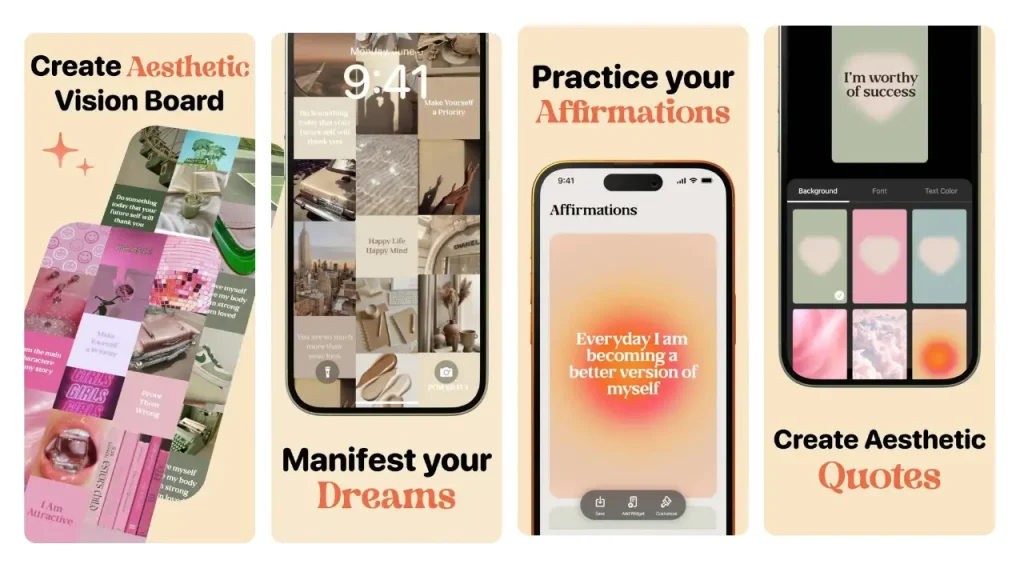
Audience
The app is suitable for beginners due to its simplicity and ease of use. Many users, however, might find the lack of editing options, as well as the absence of an image library, limiting. If you’re looking for a more sophisticated tool with greater customization, this app might not meet your needs.
Content
One of the main drawbacks of Vision Board Aesthetic is the lack of a built-in image library and only a very limited affirmation library. Users must upload their own images and create their own quotes, which is very time-consuming. The absence of these built-in resources could deter users who prefer having a variety of pre-made options to choose from.
Customization
The app offers some customization, particularly when adding quotes. You can select from different background colors to personalize your quotes, but that’s where the customization ends. You can’t change the layout beyond the initial selection between landscape or portrait formats, and once images or quotes are added, they cannot be edited. This limitation might frustrate users who want more control over their vision board’s appearance.
Features
Vision Board – Aesthetic lacks many of the advanced features found in other vision board apps, such as a vision board video clip with moving images, music and voices for spoken affirmations. It does offer the ability to add widgets and save boards as wallpapers.
Visualization and Manifestation Effect
The app’s final output is more akin to a mood board than a traditional vision board, and its effectiveness in aiding visualization and manifestation may be limited. The inability to view images in full screen and the somewhat cluttered appearance of the final board may detract from its motivational impact. However, being able to set the board as your wallpaper offers a constant reminder of your goals.
User Rating and Number of Ratings
Vision Board Aesthetic has a solid iPhone rating (US) of 4.7* stars based on 3756 user ratings, indicating a decent user base.
Operating System and Synchronizing Across Multiple Devices
The app is only available on iOS. The app does not support synchronization across multiple devices, which is a disadvantage for users who want to access their vision boards on the iPad.
Subscription Model and Price
Vision Board – Aesthetic is free to download, but accessing additional features like creating multiple vision boards and adding custom quotes requires a subscription. The subscription costs $6 per week or $23 per year, which is reasonable but may still feel expensive given the app’s limitations. Unlike some other apps, it does not offer a free trial.
Vision Board Aesthetic App - Summary Pros and Cons
Pros:
- Simple interface that allows quick creation of boards
- Add quotes with different background colors
- You can save vision boards as wallpapers
- Includes goal tracker and widget functionality
Cons:
- Limited Functionality: no option to edit images or add additional images once added
- No Built-In Content: Lacks an image library and has only a small affirmation library
- Final board may not be as visually appealing, and no full-screen viewing
- Available exclusively on the iPhone, not iPad. No Android support
Final Thoughts
For those looking for an aesthetically focused vision board app, Vision Board Aesthetic may be a good fit. However, the app’s lack of features, no image library, only a small affirmation library, limited customization options, and the need to upload your own content may lead some users to explore other, more content-rich and feature-rich alternatives.

Vision Board ++
iPhone – Rating (US): 4.9* stars – 3001 user ratings
Android – Rating: N/A
Free Trial: 3 days
Time to create a vision board: 7 – 10 mins
Vision Board ++ – download
Vision Board ++ is a full-featured vision board app for iPhone only. It covers images, affirmations, music, spoken voice and slideshows, and most of it works without paying.
Usability
The app does a lot, and the creation flow shows it. Layers stack on top of each other and it takes a few sessions before the order of operations feels obvious. Once it clicks, the app is quick. First-time users should expect to restart a board once.
Vision Board ++ in app screens
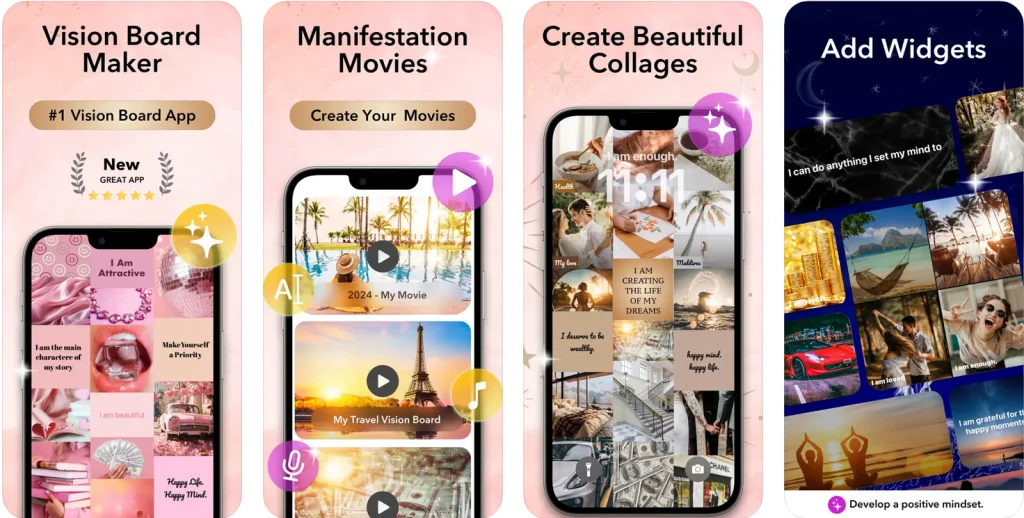
Audience
Suits people who want control over every element and do not mind learning an interface to get it. Anyone looking to build one board in five minutes and move on will find the layer system heavy.
Content
Vision Board ++ has both libraries. The image library spans love, family, health, wealth and gratitude, and you can upload your own photos alongside it. There is an affirmation library, so you are not writing every line from scratch. A music library covers the audio side. It lacks fully integrated image web search.
Customization
Text is fully editable. You choose the font and the colour, and you write your own affirmations or pull them from the library. The one limit is layout: boards follow set arrangements rather than a free form canvas, so you cannot place an image anywhere you like.
Features
The app builds a video slideshow for each board, with background music and spoken affirmations over the top. You pick from a range of female and male voices, or record your own. Widgets and daily affirmations keep the board in view between sessions, and a gratitude journal sits alongside. Boards sync across devices.
Visualization and Manifestation Effect
The slideshow is the strongest part. Images, music and a spoken affirmation running together hold attention in a way a static grid does not, and the option to hear the affirmation in your own voice makes the board harder to scroll past.
User Rating and Number of Ratings
Vision Board ++ has an iPhone rating of 4.9* stars from 3001 user
ratings.
Operating System and Synchronizing Across Multiple Devices
The Vision Board ++ app is only available for iOS and only for iPhone. It does sync with other Apple devices such as the iPad.
Subscription Model and Price
Free to download, and the 3-day trial version covers the basics of building a board. Plus features cost $5 per month or $19 per year.
Vision Board ++ App - Summary Pros and Cons
Pros:
- Built-in image library and affirmation library
- Video slideshow with your own music and spoken affirmations
- Record your own voice, or pick from voices
- Wide choice of fonts and colors
- Widgets and gratitude journal
- Syncs across Apple devices
Cons:
- iOS only. No Android version
- The layered creation flow takes time to learn
- No free-form layout. Boards follow set arrangements
- Only 3-days of free trial
Final Thoughts
Vision Board ++ is a complex vision board app. If you use an iPhone and you want libraries, voices and a slideshow, this is a good alternative. The trade-offs are the learning curve and the lack of an Android version.

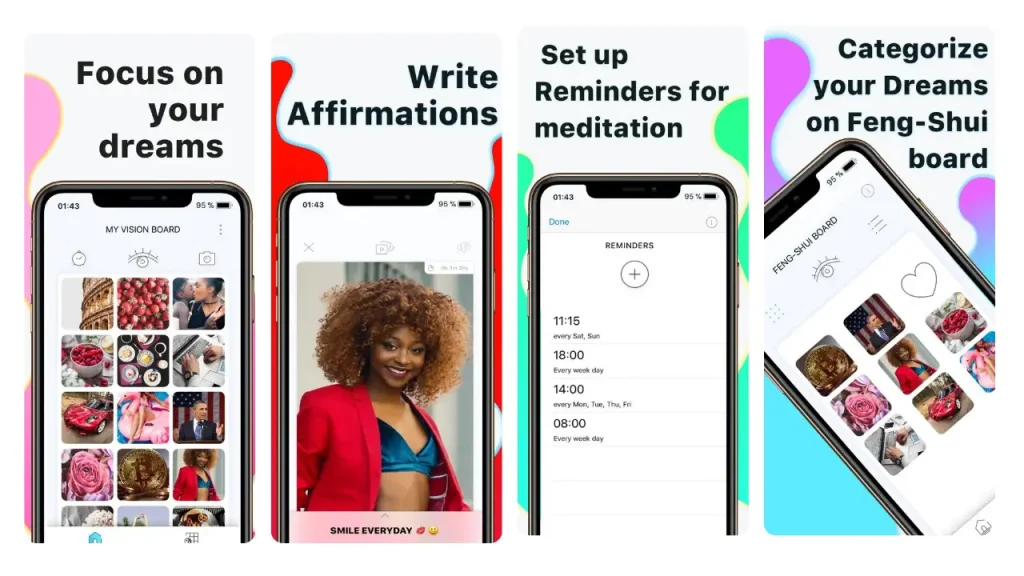
Visuapp is a straightforward tool designed for users who prefer a basic vision board experience without unnecessary frills. Here’s a concise evaluation based on key criteria.
Usability
Visuapp offers a simple and user-friendly interface, making it easy to create a vision board in about 10 – 20 minutes. Users can easily upload their own images and write affirmations, but the app lacks an in-app image library, so you’ll need to prepare your visuals beforehand. The process is straightforward, but the app’s limited functionality might not satisfy those looking for more robust features.
Visuapp in app screens
Audience
This app is ideal for beginners or users seeking a minimalist approach. Advanced users may find it lacking in features like extensive customization or a variety of pre loaded content.
Content
Visuapp falls short in content offerings, with no built in image library or affirmation library. Users must upload their own images, which could be a drawback for those who prefer having a selection of ready made content at their disposal. Why? A built in image and affirmation library makes the process of creating vision boards much more efficient and dramatically reduces the time it takes to find content that resonates with you.
Customization
Customization is limited. You can add text and choose a “cover” image for each goal, but there’s little flexibility beyond that. The app’s interface is functional but not particularly visually appealing, and the final vision board isn’t easily saved as an image that fits well on a phone screen.
Features
Visuapp offers basic features like setting reminders for goal visualization and adding text or music to your vision board. However, it lacks more advanced features such as moving images or widgets. Premium users can access a Feng Shui board, adding a unique categorization tool, but otherwise, the app remains quite basic.
Visualization and Manifestation Effect
The app’s focus on the Feng Shui Bagua Map can be helpful for structured goal setting. However, the limited image library and lack of advanced visualization features might reduce its overall effectiveness for users looking for a more immersive experience.
User Rating and Number of Ratings
Visuapp has an Android rating of 4.6* stars, which is at the low end of the reviewed vision board apps. The relatively low rating is based on 4951 user ratings and is therefore quite meaningful. The iPhone rating (US) is 4.7* (2187 ratings).
Operating System and Synchronizing Across Multiple Devices
Visuapp is available on both iOS iPhone and Android, making it accessible to a wide range of users.
Subscription Model and Price
Visuapp is free to download with ads, and there’s an option to upgrade for premium features. This freemium model allows users to explore the app’s basic features before deciding whether to pay for additional tools like the Feng Shui board or ad removal. In-App Purchases are Feng Shui Vision Board $3, Gratitude Journal$2, Slideshow $1, Remove Ads $5.
Visuapp - Summary Pros and Cons
Pros:
- You can upload images and write affirmations
- Notifications for goal visualization
- Available on Both iOS and Android
Cons:
- Limited Customization: Minimal design and layout options
- Limited built in Content: Lacks an image library or affirmation library
- Final board doesn’t fit well on a phone screen
- Frequent ads unless upgraded
Final Thoughts
Visuapp is suited for users seeking a no frills digital vision board experience, focusing on basic functionality. However, if you’re looking for more visual appeal, customization, image and affirmation libraries or advanced features, you might want to explore other options.
Visbo is a tool for users who want a basic vision board experience without any extra bells and whistles. Here’s a quick review based on the most important features.
Usability
Visbo has a user friendly interface, so you can create a vision board in about 5-10 minutes. It’s really easy for users to upload images from the app’s library or from their own collection. You can write affirmations, but there isn’t an affirmation library.
Visbo in app screens

Audience
This app is good for beginners or users seeking a minimalist approach. Advanced users may find it lacking in features like extensive customization or a variety of pre loaded affirmations.
Content
Visbo has a nice built in image library but falls short in content with no affirmation library. Users must write their own affirmations. There are no voices for spoken affirmations available.
Customization
There’s not a lot you can customize. For instance, the affirmation text is quite small and difficult to read. Unfortunately, you can’t customize the font style, size, or color of the affirmation text. You also can’t choose different image formats and sizes.
Features
Visbo offers some basic features like adding text to your vision board. It also offers a reel function and the ability to add music. It also offers reminders and widgets. However, the app seems to be quite buggy as the widget functionality didn’t work and some of the tutorial blogs didn’t open. Also, the app doesn’t have a mood journal, gratitude journal, or goal tracker to monitor progress.
Visualization and Manifestation Effect
The Visbo app is primarily designed for viewing your vision board and visualizing your dreams. However, the lack of full-screen image viewing on your phone screen may reduce its effectiveness for some users.
User Rating and Number of Ratings
Visbo’s Google Playstore rating of 3.9* is the lowest of all reviewed vision board apps. Visbo has an iPhone rating (US) of 4.5* stars, which is at the very low end of the reviewed vision board apps. The rating is based on only 102 user ratings, so the user base seems to be quite small as well.
Operating System and Synchronizing Across Multiple Devices
Visbo is available for both iOS iPhone and Android.
Subscription Model and Price
Visbo is free to download and offers a 7 day free trial. The annual subscription is $21 per year.
Visbo - Summary Pros and Cons
Pros:
- Easy to upload images and write affirmations
- Notifications for goal visualization
- Available on Both iOS and Android
Cons:
- No full screen image viewing limits effectiveness of vision boards
- Minimal design and layout options
- Lacks a library of affirmations
- Widgets and some of the tutorial blogs did not work
Final Thoughts
Visbo is best suited for users looking for a very basic, no frills vision board experience that focuses on a basic functionality. However, if you’re looking for more visual appeal, customization and an affirmation library or advanced additional features, you may want to explore other options.
Hay House Vision Board: no longer available
Hay House Vision Board appears in most vision board app comparisons published in 2026, usually as the recommended dedicated app or the pick for a one-time purchase instead of a subscription.
It is not in the US App Store. The listing returns an error, and Hay House’s own website now points visitors from that product page toward its other apps. The last version was 2.1.
Checked 25 August 2026. If Hay House brings it back we will add it to the table above.
Pinterest is not a vision board app. It is an image discovery engine, and it is
where most people find the pictures that end up on a board. Search “coastal home
office” and the feed surfaces forty images you would never have thought to look
for. A board fills in ten minutes.
That is the whole strength, and it is a real one. No other tool on this page finds
images this fast, and it costs nothing.
What Pinterest cannot do is everything that happens after you collect the images.
There is no layout, so the board stays a scrolling grid rather than one view you
take in at a glance. There are no affirmations, no spoken audio, no music, no
reminders. Nothing brings you back tomorrow. The feed also keeps pulling toward
general browsing, so the board competes with recipes and holiday photos for your
attention.
Most people who use Pinterest for a vision board end up building the actual board
somewhere else.
Best for: gathering images before you build the board in a dedicated app.
Price: free.
Canva
Canva is a design tool. Vision boards are one template among thousands, and the
app was built to make posters, decks and social posts.
For a printed board, Canva is the strongest option here. You arrange images and
text freely, choose from a large stock library, set any font, and export as PNG
or PDF. If you want something on the wall above your desk, or a desktop wallpaper
at exact pixel dimensions, this is the tool that produces it.
The gap is what happens next. Canva has no reminders, no affirmation library, no
audio, and no daily review mode. The file is finished when you export it, and the
app gives you no reason to open it again. Editing on a phone works but the canvas
is built for a larger screen, so a quick morning look is awkward. Premium images
and some elements sit behind a paid plan.
A Canva board is a design. Whether it becomes a practice depends entirely on
where you put the finished file.
Best for: a printed vision board or a wallpaper, made by someone who enjoys
designing.
Price: free tier, paid plans for premium assets.
Notion
Notion is a note-taking and database app. People build vision boards in it because they already run the rest of their life there.
What Notion adds that no dedicated app matches is structure underneath the images.A goal gets a page. The page holds a deadline, a status, a set of next actions and whatever notes you keep. You can embed the images on a gallery view and click straight through from a picture to the plan behind it.
For anyone who thinks in tables and properties, that connection is the reason to use it. The cost is setup and feel. You build the structure before anything works, and an hour of database configuration is not what most people want on a Sunday afternoon. Images sit in a grid rather than a composition, so the board looks like a project tracker. There are no affirmations, no audio, no widgets tuned to daily review. Mobile is functional and no more.
Best for: people who already live in Notion and want goals and images in one workspace. Price: free for individuals, paid plans for teams.
FAQs - Frequently asked questions
What is the best vision board app?
Perfectly Happy is the best vision board app for an all-in-one mobile board. It has built-in image, affirmation, music and voice libraries plus in-app web search, and runs on both iPhone and Android. A finished board takes five minutes because the content sits inside the app.
What is a digital vision board app?
A digital vision board app is a mobile or web application that holds your goals as images, words and affirmations in one place on your phone. It replaces the paper board and corkboard, so you can edit the board and look at it anywhere. Most also add reminders, widgets or journaling to bring you back to it daily.
Which vision board apps work on Android?
Three of the ten apps we tested run on Android: Perfectly Happy, Visuapp and Visbo. The other seven are iPhone only. Perfectly Happy scores 4.6 stars from 1995 Google Play ratings and syncs across phone, iPad and tablets.
How long does it take to make a vision board in an app?
Five to twenty minutes, depending on whether the app has a built-in image library. We built a complete board in Perfectly Happy in five minutes because the images, affirmations and music sit inside the app. Apps with no image library took ten to twenty minutes, because you have to find and upload every image yourself first.
Which vision board apps have built-in affirmations?
Perfectly Happy holds the largest affirmation library of the apps we tested, with over 6,000 affirmations. It is also the only app that offers spoken affirmations in a choice of male and female voices, or recorded in your own voice. Most apps in this comparison have no affirmation library at all, so you write every line yourself.
Do digital vision board apps really work?
Vision boards have gained popularity thanks to endorsements from celebrities such as Oprah Winfrey, Victoria Beckham, Jennifer Aniston, Jim Carrey, Jennifer Lopez and Reese Witherspoon, and sports icons such as Tiger Woods. Oprah attributes her success to the power of manifesting and has shared how vision boards can help others.
Research backs this up: studies on athletes show that visualization can be almost as effective as physical practice (“Does Mental Practice Enhance Performance?“ by James E. Driskell et al.). Vision boards serve as a fun, creative project where individuals visualize their goals. Psychologist Gabriele Oettingen emphasizes that pairing visualization with action steps leads to greater success ( “Mental contrasting instigates goal pursuit by linking obstacles of reality with instrumental behavior”, Gabrielle Oettingen & Andreas Kappes). If, for example, you want to improve body confidence, a vision board filled with empowering images and words can keep that goal front and center, motivating real progress.
Creating a vision board involves self reflection, gathering inspiring images, and placing it somewhere you’ll frequently see to reinforce your goals.
A vision board app is an effective and straightforward tool for achieving better results by aligning internal motivation, confidence, and clear, structured goals. It can increase intrinsic motivation, self efficacy, and goal-setting abilities, which are essential for achieving desired outcomes.
Intrinsic motivation, involving task engagement for inherent enjoyment, significantly enhances persistence and goal attainment (“The “what” and “why” of goal pursuits: Human needs and the self-determination of behavior.” by Edward L. Deci & Richard M. Ryan).
The study “When Visions Truly Inspire” by Julian Voigt, Kennon M. Sheldon & Hugo M. Kehr investigates the moderating role of self concordance in how visions evoke positive affect and drive goal commitment and progress. This research bridges the gap between vision and self concordance literature, offering a comprehensive understanding of how deeply aligned visions can lead to enhanced goal progress and emotional well being. Visions, defined as vivid mental images of desirable future states (“The motivating power of visionary images: effects on motivation, affect, and behavior” by Maika Rawolle), have long been shown to enhance motivation and performance in organizational settings (“A longitudinal study of the relation of vision and vision communication to venture growth in entrepreneurial firms” JR Baum; “Visions of Change as Visions of Continuity“ Merlijn Venus).
The authors use self determination theory to hypothesize that visions are more effective when they align with an individual’s intrinsic values, or “self concordance” (Sheldon, 2014). Across three experiments, they demonstrate that self concordant visions generate stronger emotional responses and higher commitment to vision driven goals. For example, in their first experiment (N = 358), participants with high self concordance experienced greater positive affect when imagining their vision, compared to simply listing goals. This effect was replicated in a second study with a one month time-lag (N = 288), where participants with high self concordance showed increased goal commitment. A final study (N = 254) extended these findings to show that self concordant visions also boost goal progress.
These results underscore the importance of self concordance in vision based goal pursuit, suggesting that personal alignment is key for the emotional and motivational power of visions to fully materialize (Carton & Lucas, 2018; Jennings et al., 2022).
This highlights the critical role of personal alignment in making visions effective for goal achievement. Their findings deepen understanding of how visions drive motivation and success.
Similarly, self efficacy, or belief in one’s ability to succeed, plays a critical role in driving goal achievement by promoting perseverance and setting challenging objectives (“Self-efficacy: The exercise of control.” by Albert Bandura).
The study “Building a Practically Useful Theory of Goal Setting and Task Motivation: A 35Year Odyssey” by Edwin A. Locke & Gary P. Latham on SMART goals emphasizes that setting Specific, Measurable, Achievable, Relevant, and Time bound goals significantly enhances motivation and performance. Their research found that clear and challenging goals lead to better focus, effort, and persistence. SMART goals provide structure and direction, making it easier for individuals to track progress and stay motivated. Locke & Latham also highlight that feedback and commitment to the goals are essential for maximizing performance and achieving success.
What is the best free digital vision board app for 2026?
Perfectly Happy Vision Board App stands out as the best free digital vision board app thanks to its user friendly interface, extensive content libraries, and powerful customization features.
Perfectly Happy has the most generous free tier of the apps we tested. The free version includes one vision board, the full 6,000-affirmation library, two image libraries, in-app web search, widgets, reminders, a gratitude journal and a mood tracker. The video slideshow with music and spoken affirmations is also free. Only some premium affirmation categories need a subscription. Available on both iOS and Android, it syncs across devices, ensuring your goals are always with you.
Pinterest and Canva are free and have no paid tier for this use, but neither is a vision board app. Neither has affirmations, reminders or a daily review mode.
Download Perfectly Happy Vision Board App
What is the best free digital vision board app for iPad for 2026?
Perfectly Happy Vision Board App is the top free digital vision board app for iPad, offering a beautifully intuitive design that adapts to any screen size. It provides free access to vision boards, affirmations, widgets, and gratitude and mood journals, making it ideal for both beginners and advanced users. What sets it apart is its extensive content, featuring two large in app image libraries, a web search function, and over 6,000 affirmations, allowing users to quickly create personalized boards. The app’s customizable video slideshows, complete with music and spoken affirmations, bring goals to life, making visualization more vivid and turning aspirations into tangible reality. Download Perfectly Happy Vision Board App